ISC2 CC Practice Test - Pass the Certified in Cybersecurity (CC) Exam

ISC2 CC Practice Test
What is the Certified in Cybersecurity (CC) Certification

The Certified in Cybersecurity, or in short CC, is a foundational certificate for people with no or limited cybersecurity background. It is a valuable certificate that validates your foundational knowledge in IT, networking, and digital security, and it covers five main areas: security principles, Business Continuity (BC), access control concepts, and network and operations security.
Passing this certificate is a great way to get started in the fascinating and growing world of IT security. In this article, we will cover everything you need to know about how to pass and practice for your CC certificate. Also, since I passed the exam on my own, I will include what has helped me the most.
Why is the Certified in Cybersecurity (CC) Certification useful?

As previously stated, the CC certificate demonstrates your solid understanding of key security principles and concepts. This is especially useful for newcomers who want to showcase their skills and foundation, such as juniors or career changers. CC will likely not be the main selling point on your CV, but it can enhance and demonstrate your basic knowledge in this field. You can see it as your first step in this fascinating world of security.
For me, this exam was a great way to see if I would like a career in this field, and passing it made me realise how much more I want to learn and progress in it. Now, I am studying for the CompTIA Security+, CISM, and hopefully the CISSP exams.
Background on the CC exam

You have 2 hours to complete the exam, which consists of approximately 100-125 multiple-choice questions. The test can be taken in English, Japanese, German, Spanish, or Chinese, and to pass, you need to get at least 70%. If you pass our practice test with a score of over 85%, you can be confident in your skill level and try the test.
ISC2 (the organisation behind it) is proud to use a Computerised Adaptive Testing (CAT) method for this exam, which, simply put, is a dynamic exam that first tests your knowledge with straightforward questions and then progressively more difficult questions to assess your actual knowledge level.
All CC topics
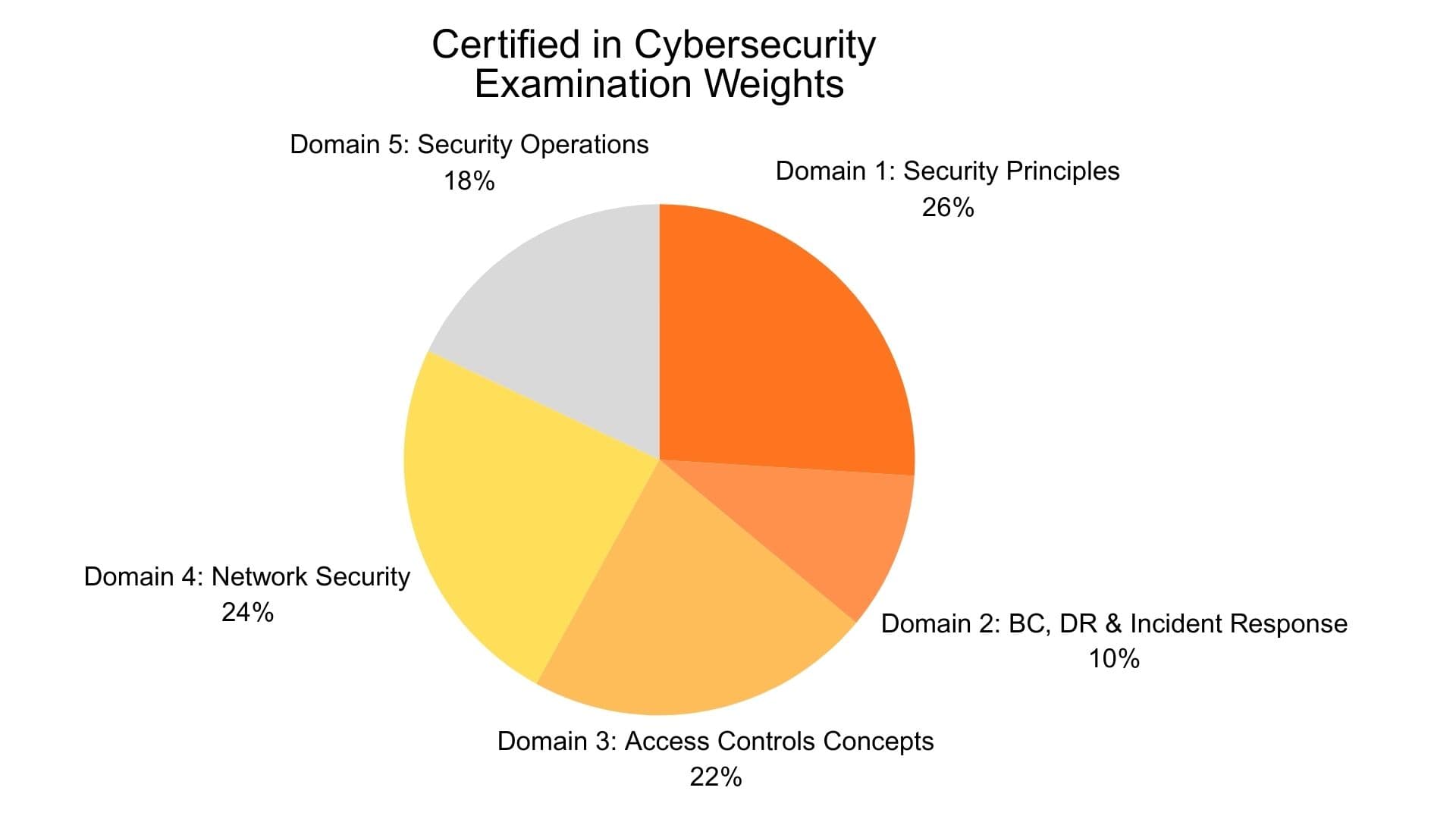
In this section, we give a brief introduction to each topic covered by the exam. The percentage indicates the weight the specific theme has in the test and how much it influences your grade. For example, Security principles account for 26% of the entire test and are therefore more important to know well than Business Continuity, which accounts for only 10%.
The following 5 topics are covered in the exam. We try to briefly explain in each topic, with the bullet points, all concepts as clearly as possible:
Security Principles - 26%
This section is all about you understanding the core concepts of security:
- Confidentiality is the foundation for keeping your data secret and ensuring that no one is authorised to access it. It encrypts data at rest (e.g., AES-256), data in motion (e.g., SSL), and ensures that data in use follows best practices, such as a clean desk or screen-view angle protector policy. Confidentiality also includes strong passwords, multi-factor authentication, and access controls, as its main threats are social engineering (when attackers impersonate others to obtain confidential information) and attacks on encryption.
- Integrity is the way to protect against modification in the data and systems nad is here to ensure data has not been altered. To fulfil this requirement, digital signatures, access control, cryptography, and checksums can be used, as their main threats are unauthorised data alteration, code injection, and attacks on encryption.
- Availability is the way to ensure authourised users have the access they need when they need it. For this, we use intrusion prevention systems (IPS), intrusion detection systems (IDS), patch management, or a service-level agreement (or short SLA) with our supplier to ensure we maintain at least 99.9% uptime.
- Authentication is how you prove yourself as a user to become authorised to access a specific resource. There are three types of authentication, with 1 being the weakest and 3 the strongest: Type 1 is PIN, password, or passphrase; Type 2 is ID, passport, smart card check, or single-use password; and Type 3 is fingerprint, iris scan, or other biometric checks. Authentication should always use multi-factor authentication (MFA). Make sure your passwords are complex, at least a certain length, and not easy to guess.
- Non-repudiation is when a user cannot deny having preformed a specific action and requires both high level of authentification and integrity.
- Privacy is a human right, where you are free from being observed and disturbed by other people and free from unauthorised intrusion.
- Risks are treated as a combination of the level of threat (i.e., how harmful an incident is), the degree of vulnerability (i.e., how weak your system is), and the impact of this specific risk (i.e., financial or employee harm).
- Risk management is when you have to prioritise, tolerate and manage a certain degree of risks. Risk management is an iterative lifecycle in which you identify tangible (e.g., physical hardware) and intangible (e.g., data) assets, along with their associated risks.
- Risk identification and assessment is a way to quantitatively and qualitatively analyse risk, where you need to always evelaute the cost-benefit and determine whether to mitigate (i.e. lower the likelihood to an acceptable level), transference (ex. insure an asset), acceptance (i.e. accepting the potential costs), and avoidance (i.e., take actions against the root cause of it to avoid it altogether) risks.
- Technical controls are hardware, software of firmaware controls, such as firewalls, routers and encription.
- Administrative controls is how your organisation is set up, such as organisational policies, procedures, regulation, training and awareness.
- Physical controls are for example locks, guards, fences, gates or even dogs.
- Professional code of conduct is an ethical framework developed by ISC2. It has four core principles, which are 1. benefit the society (not harm it), 2. be honest and truthful, 3. provide a competent service to the best of your ability, and lastly 4. contribute positively to the field of cybersecurity.
- Policies are set by the C-level of the company as part of their overall governance structure. They are mandatory, high-level, non-specific company rules that need to be followed.
- Procedures are low level specfic step-by-step guides, which explaines something like OS encryption type or to use a specific software.
- Standards explains how to use a specifc use of technology, such as all laptops needing 8 GB memory.
- Regulations and laws are helpful to know in this exam. You need to understand the differences between criminal, civil, administrative, customary, and religious law, as well as private regulations (e.g., PCI-DSS) and other regulations such as HIPAA (short for Health Insurance Portability and Accountability Act), ECPA (short for Electronic Communications Privacy Act), and GDPR.
BC, DR & Incident Response Concepts - 10%

This section covers everything related to Business Continuity (BC), Disaster Recovery (DR), and Incident Response:
- Business continuity (BC) are long-term strategic policies, procedures and plans to make sure an organisation can continue operation even after disruptive events. They are written in advance, continually improved, and usually outline the steps to take when different disaster scenarios occur to resume regular operations. BC is important for obvious reasons, ensuring an organisation can continue its operations even if a disaster hits it. BC usually includes a Disaster Recovery (DR) Plan, a Continuity of Operations Plan (COOP), a Crisis Communication Plan, a Business Recovery Plan (BRP), and an Occupant Emergency Plan. More practically speaking, with the BC, you analyse, for example, what to do if a critical supplier is bankrupt, or an earthquake hits a facility.
- Disaster recovery (DR) is a plan focused on an organisations IT systems to see how to recover as fast as possible in a disaster recovery. DR is organised in four connecting phases, which are 1. mitigation (i.e., reducing risk or potential damage, such as backups or security controls), 2. preparation (i.e., planning to be able to react well, such as employee training), 3. response (i.e. immediate actions taken when a disaster hits), and recovery (i.e. efforts to restore all systems and data to resume to normal operations). The DR can include a Cyber Incident Response Plan that outlines how an organisation can respond to cyber events, such as viruses, worms, or DDoS attacks.
- COOP (Continuity of Operations Plan) is a plan to outline how to keep operation in case of emergency, spanning from staff members to outlining backups and plan b.
- Crisis Communications Plan is a prepared document to plan how to communicate with internal and external stakeholders, as well as the press.
- OEP (Occupant Emergency Plan) looks at how you can protect an organisation facilities, environment and staff in case of an emergency. Simply put, it explains what the organisation should do in the event of a criminal attack, terrorism, floods, or a fire. The primary focus is on safety, evacuation procedures, and staff training, such as conducting fire drills.
- Incident response is a structured process to deal with incidents. The core principles to deal with it are preparation (i.e., developing comprehensive BC and DR), identification (i.e., classification of the incident, such as the severity or category it is), containment (i.e., limiting the spread and damage of the attack), eradication (i.e. doing analysis and trying to fix the root cause), recovery (i.e., making sure all systems and operations are back to normal), and lessons learned (i.e., documenting a post mortem to understand how to avoud this issue in the future again.
Access Controls Concepts - 22%

This section discusses the importance of access control concepts to keep your files secure and well monitored:
- Physical security controls is as the name suggests physical security tools, such as badges systems, gates or fences.
- Monitoring is essential in keeping track what is going on in daily operations, such as a logging systems in a software, CCTV, or even secuirty guards.
- We can authorise or unauthorise personnel when we use Access Control systems, as we can determine how much and what a user can access.
- Principle of least privilege is a principle, when users are always given the minimum necessary access, as they only need exactly the minimum amount to lower risks.
- Segregation of duties is when important tasks has internal controls to prevent fraud or errors, such as payroll softwares.
- Discretionary access control (DAC) is often used when the above descriped trait availability is most important theme. This means an owner can give writer, reader, or commentator access, or remove rights.
- Mandatory access control (MAC) is when access to an object is determined by labels and clearance, which is a common trait in the military or highly confidential organisations. Each object, such as a Word file, has a specific label assigned to it, such as ‘public’, ‘confidential’, or ‘internal use only’. Through this label, only authorised users can access them.
- Role-based access control (RBAC) is also an access control, only allowing based on rules, such as a specific time, location, or devices.
Network Security - 24%

This section talks about how you can secure your network:
- Networks is a set of computers sharing data or resources, which can include Open Systems Interconnection (OSI) models, an Internet Protocol version 6 (IPv6) or simply a WiFi network. There are different ways of how data is transferred, such as simplex (i.e., one system sends, the other listens), half-duplex (i.e., both system send or receive, but only one at a time), full-duplex (i.e., both system simultaneously sending and receiving data), Personal Area Network (PAN; i.e., systems close to a device and having wireless or wired transmission, such as printers or headphones), or Virtual Private Network (VPN).
- Ports are communcation endpoints, which basically means, when we send or receive, we need to know not only which device we need to send the data to (i.e., IP address), but which program or service this device is using, which is a port. For example, in your browser, each tab has its own port. The IANA globally defines ports, and common ones include 20 (for FTP data transfer), 80 (for Hypertext Transfer Protocol, or more simply HTTP), or 25 (for the Simple Mail Transfer Protocol, or short SMTP).
- Applications are computer programs that perform a specific task, such as a web application, desktop or a mobile app.
- There a many different types of threats, such as the commonly known virus, trojans, distributed denial-of-service (DDoS), or OS vulnerabilities. It spans a wide range of threats, including data emanation, theft, eavesdropping, MAC spoofing, or flooding.
- Identification is the most crucial step to detect issues in your network. Only if you see that you have a problem, you can fix it. This is why systems like intrusion detection systems (IDSs), network intrusion detection systems (NIDSs), and host-based intrusion detection systems (HIDSs) are so important, as they scan your network and report on unusual or suspicious traffic.
- Prevention is when you prevent yourself from threaths, such as with intrusion prevention system (IPS), where they take action to malicious traffic. When an event triggers an action, it drops or redirects traffic and contacts administrators. Other preventive measures include firewalls, scans, and antivirus software.
- Cloud is when your software, such as a Software as a Service (SaaS; ex., Gmail), Infrastructure as a Service (IaaS; ex., AWS), Platform as a Service (PaaS; ex., Google App Engine), is hosted on the cloud. Relevant in this regard, from a cyber perspective, are service-level agreements (SLAs) to ensure your suppliers meet your expectations, such as uptime or response time. Also, managed service providers (MSPs) can be relevant to your cyber experts, as they are third-party companies that maintain your organisation's IT infrastructure and systems.
- On-premises is when your data centers are not in the cloud, but locally on your premise, which usually is more secure, if using best practices, but also mostly more expensive. It uses data centres, ventilation, heating, fire suppression, and a memorandum of agreement (MOA).
- Secure Design are principles, such as only providing least privilege, separating duties (ex. writing and controlling payroll), trust but verify, zero trust (i.e. never trust and always verify), secure failures, or keep security simple.
- Demilitarised zone (DMZ) acts like a buffer between an untrusted external network (ex. internet) and a trusted internal network (ex. sensitive patients data). This zone allows an organisation to use both public-facing services (e.g., SaaS applications) while isolating them. Typically, a DMZ uses two firewalls in a screened subnet.
- Defense in depth is a layered defense, where we implement multiple overlapping security controls to protect an asset, which can include administrative, physical and logical layers.
- Network Access Control (NAC) is an automatic detection and response system to make sure an organisations systems adhere to all security policies and can help to reduce and prevent of known attacks.
Security Operations - 18%

This section is about best practices in security operations:
- Encryption is when plain text is turned into encrypted code. There are different types of encryption, such as hashing (to ensure data integrity), symmetric (i.e., single, shared secret key), and asymmetric encryption (i.e., using a public and private key).
- Data handling is when only trusted users can handle an organisations data, which icnludes policies on when, how, where and why the data was handled.
- Configuration management is when new systems are built, the respective organisation needs to establish a baseline and harden the environment to reduce weak links in a network.
- Data handling policy is when you define how to label, classify, store, backup and destroy data.
- Password policy is common way to define what a password needs. It usually involves a high level of complexity, must be changed every 90 days, or must have at least 8 characters.
- Acceptable Use Policy (AUP) is an agreement with an organisations user to explicitively state what usage of the netowrk, resources and data are acceptable.
- Bring your own device (BYOD) is an organisations policy, which tells employees how to use their own devices within the organisations network.
- Change management is a policy, which describes how an organisations should handle changes to their environment. If done correctly, an organisation will have a complete understanding of how to communicate changes to all relevant parties.
- Privacy policy is an essential documentation to describe how an organisation gathers, uses, discloses, and manages private data.
- Social Engineering uses social skills to go around security control, such as attackers pretending to be authority or intimating someone to gain access.
How to best pass the Certified in Cybersecurity (CC) exam?
There are many ways to pass this exam, but in my opinion, the most efficient and innovative way to pass this exam is how I did it and how I would do it again:
- First, you need to know where your strengths and weaknesses lie, so you should try our practice exam at the top. See where you do well and where you don't. Based on this, look at each mistake you made, and try to understand why these answers were wrong.
- Once you have identified a theme of wrong answers, read more on that topic to become proficient and retake the test until you hit 85% in our practice test. That is the most efficient way I would go about it, and how I passed it while just studying a bit on two weekends.
My experience with the CC test
When I applied to take the test, I was surprised to learn I had to take it in person. Among all the certificates I have ever taken, the ISC2 tests are the most strict in terms of environment. You have to go to an official testing centre (Pearson VUE in my case), book it two weeks in advance, then on testing day arrive at least 30 minutes early, bring two valid forms of identification, sign the agreements, get checked, and get a biometric scan. In a way, it was very professionally done (much more than other certifications), but also unnecessarily overdone. Once, I sat at my table with 50 cameras pointing at me, I was surprised by how slow the computers I had to use for the test were. It took like 3 minutes to just load the test, and towards the end, my computer froze, and I wasn't able to answer all the questions. At the end, though, when you leave, you will immediately know if you have passed or not, which, in my case, despite what happened, I did.
More Info on our Practice Test
To perfectly match the real life exam, our practice test consists of 100 questions, which we recommend completing within 2 hours. Each question offers 4 answer choices, but only one answer can be correct. As you answer, your progress is automatically saved in your browser, allowing you to pause and resume at any time in the same browser.
We do have instant answers if you choose to view for each question, but we recommend completing the full practice test first to receive an overall score and review which questions were correct or incorrect at the end, helping you identify areas for improvement.
Final thoughts
CC is a great starting point for any security professional. It can help guide you through the fascinating world of cybersecurity and show you where you are strong and which fields you can become an expert in.
We hope you liked our free practice exam and this article, and feel free to give us feedback anytime.